
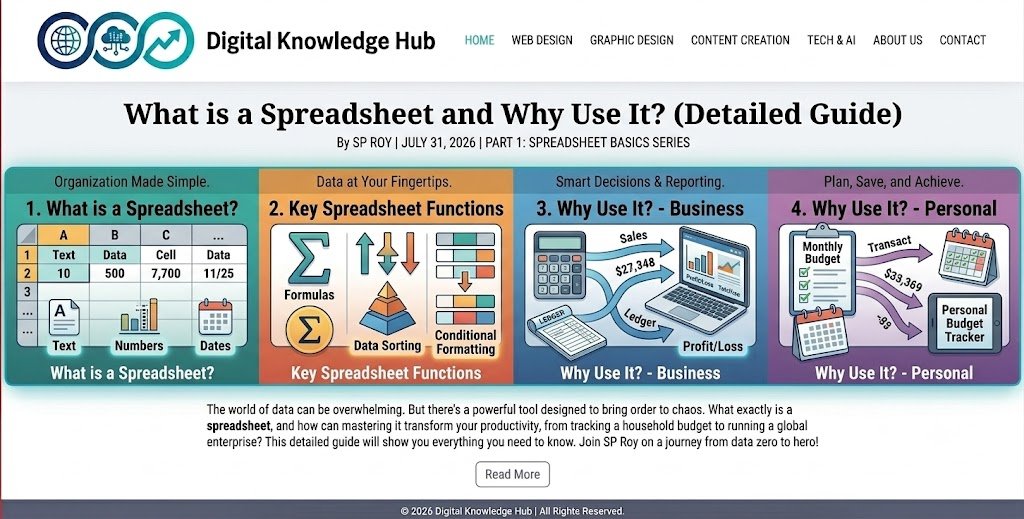

In the current digital age, the technology that has made accounting and organizing information or data easier than ever is called a spreadsheet. If you are a student, teacher, businessman, or employee, knowing how to use a spreadsheet is very important for you.
In today’s episode, we will discuss in detail the history of spreadsheets, their structure, main functions, and their importance in daily life.
1. What is a spreadsheet? (What is Spreadsheet?)
The word ‘spreadsheet’ is broken down into two words—’Spread’ (meaning: spread or extensive) and ‘Sheet’ (meaning: leaf or paper). That is, a spreadsheet is a digital sheet or table that is spread out.
Simply put: A spreadsheet is a type of computer application software that allows you to store, analyze, and perform mathematical calculations on any data or information by creating tables or charts consisting of numerous columns and rows.
2. History of Spreadsheet
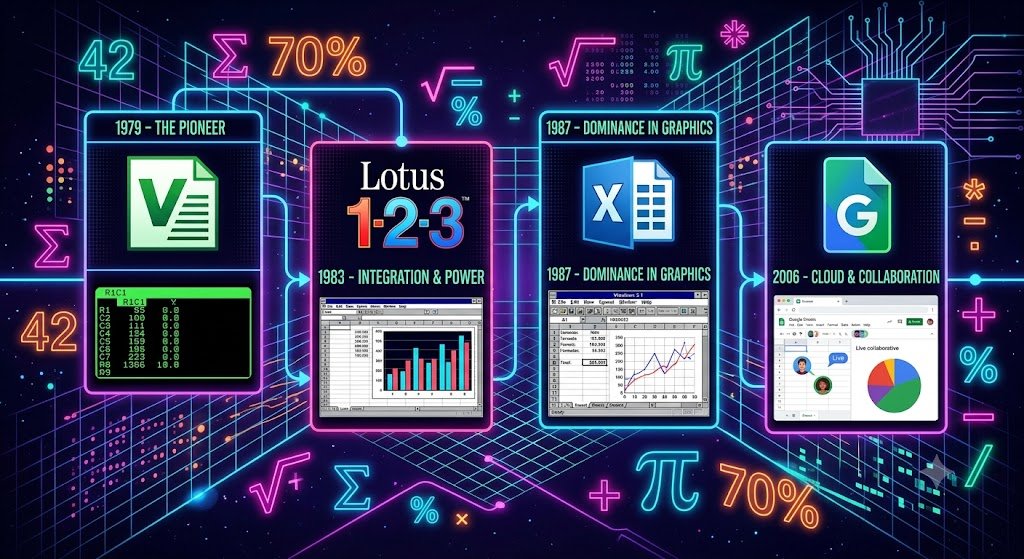
From paper ledgers to digital form: In ancient times and before the invention of computers, accountants and businessmen used to keep accounts in red and black ink on large sheets of paper. This was called a Ledger Sheet or ledger.
The first spreadsheet software: In 1979, the first spreadsheet software VisiCalc (for Apple-2 computers) was created, bringing a revolutionary change in the history of computer science.
The current era: After this, Lotus 1-2-3 came to the market. And currently, Microsoft’s Microsoft Excel and Google’s Google Sheets rule the whole world.
3. Some popular spreadsheet software
Nowadays, many types of spreadsheet software are used to facilitate work:
Microsoft Excel: The most popular and widely used offline software worldwide.
Google Sheets: Popular online software for free use on the Internet (multiple people can work together in it).
Apple Numbers: Specially designed for Apple or Mac users.
OpenOffice / LibreOffice Calc: Free and open source software.
4. Basic Structure of a Spreadsheet
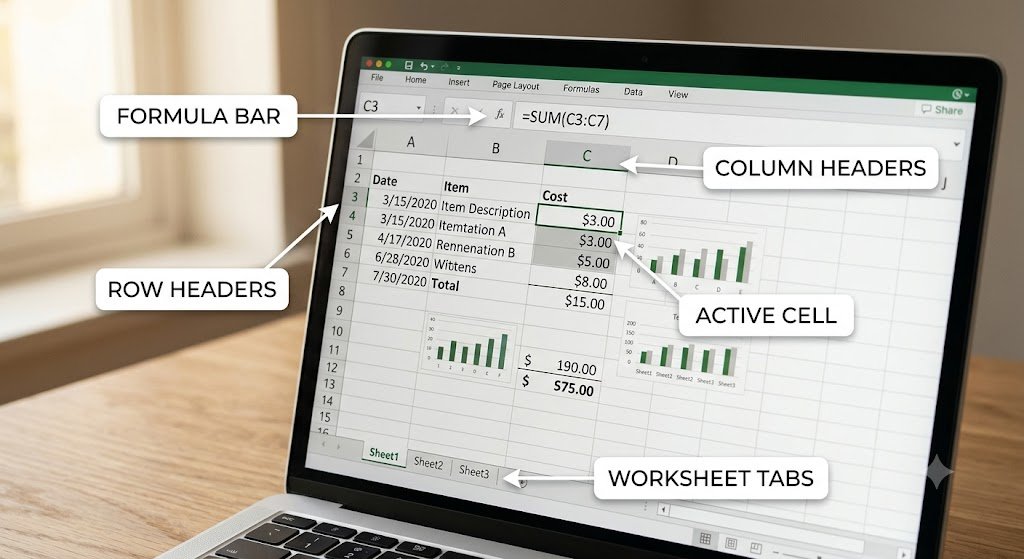
The main things we see after opening a spreadsheet are:
A. Column : The cells that are arranged vertically from top to bottom in a spreadsheet are called columns. They are usually marked with the English alphabet (A, B, C…).
B. Row : Lines extending horizontally from left to right are called rows. They are usually marked with numbers (1, 2, 3…).
C. Cell : The rectangular cell formed where a column and a row intersect is called a cell.
D. Cell Address : Each cell has its own name. For example: The cell name of column B and row number 3 is B3.
E. Worksheet and Workbook: An entire page consisting of many cells is called a worksheet.
Workbook: Multiple worksheets together create a large file, which is called a workbook (like a book with many pages)
5. Main functions and features of spreadsheets

Spreadsheets are not just for addition and subtraction, they can do many more complex tasks:
- Mathematical and mathematical formulas (Formula & Function): Any complex addition, subtraction, multiplication, division, average, percentage or percentage calculation in a spreadsheet can be solved instantly with the help of formulas.
- Automatic Calculation: If there is an error or change in any data or information, the related calculations automatically update their results.
- Data Sorting & Filtering: From the crowd of thousands of information, you can sort it by name (A-Z) or filter the information by specific criteria.
- Graphs and Charts (Data Visualization): Any information can be presented by converting raw numbers into colorful bar charts, pie charts or line graphs.
6. Practical areas or importance of using spreadsheets

A. In the field of education: To create student exam mark sheets, result sheets and grading systems.
B. In the field of business: To create inventory or goods accounts, daily income and expenditure cash memos, invoices and budgets.
C. In office management: To record employee attendance, payroll and annual performance evaluation.
D. In personal life: To keep track of your monthly expenses or savings.
Quick Summary
Column: Vertical cells, identified by letters (A, B, C…)
Row: Horizontal cells, identified by numbers (1, 2, 3…)
Cell: The intersection of a column and a row (e.g. A1, C5)
Formula: The mathematical or calculation formula used in a cell (e.g. =A1+B1)
What we will learn in the next episode:
In the next episode, we will practically open Microsoft Excel or Google Sheets and learn how to add, subtract, multiply, and divide directly, in a way that is as easy as water!
If you have any questions about today’s article, let us know in the comment box below.